
Orders Elements
With Smootify you can use Shopify accounts functionality and let your customer see placed orders directly from your site.
Conditional Visibility
You can show/hide elements only for logged-in users.
Has Orders
To show up an element only if the current user has orders, you just have to use the following custom attribute:
customer-conditionhas-ordersNo Orders
To show up an element only if the current user doesn’t have any orders, you just have to use the following custom attribute:
customer-conditionno-ordersOrders
This is the list of orders placed up by the current logged in customer, the element will be automatically duplicated once for each order placed by your customer.

User Orders
Copy Webflow element
The Element is made by two custom dom elements
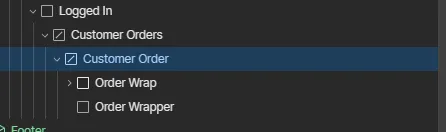
The customer order dom element will be duplicated once for each order placed. Inside this element you can add the following elements:
Order Name
Order name is an unique number associated to your order, you can add it to any text element with the following attribute:
ordernameFinancial Status
Is a label that indicates the status of the payment, you can add it to any text element with the following attribute:
orderfinancialStatusFulfillment Status
Is a label that indicates the status of the shipping, you can add it to any text element with the following attribute:
orderfulfillmentStatusBilling Address
Is the address used for billing by the customer, you can add it to any text element with the following attribute:
orderbillingAddressShipping Address
Is the address used for shipping by the customer, you can add it to any text element with the following attribute:
ordershippingAddressProcessed At
Is the date in the current browser format for the order, you can add it to any text element with the following attribute:
orderprocessedAtShipping Price
Is shipping price of the order, you can add it to any text element with the following attribute:
ordershippingPriceSubtotal Price
Is the subtotal price of the order, you can add it to any text element with the following attribute:
ordersubtotalPriceTotal Price
Is the total price of the order, you can add it to any text element with the following attribute:
ordertotalPriceTotal Tax
Is the total tax of the order, you can add it to any text element with the following attribute:
ordertotalTaxStatus Url
Is the url that will go directly to the Shopify new customers account dashboard for that specific order, you can add it to any link element with the following attribute:
orderstatusUrlCustomer Url
Is the url that will go directly to the Shopify new customers account dashboard on the profile page, you can add it to any link element with the following attribute:
ordercustomerUrlUrl
Is the url that will go directly to the Webflow Order Page, you can add it to any link element with the following attribute:
orderurl